Your best scheduler is a whiteboard and one person's memory
Oxana implements Microsoft Dynamics 365 Field Service for Australian businesses that have hit the wall where one head can no longer hold it. Microsoft Cloud Solutions Partner serving Sydney, Melbourne and Brisbane.
If that person takes leave, the week gets expensive
Field service businesses run on a set of things that live in nobody's system. Which tech is good with which customer. Which job always takes longer than quoted. Which van has the part. Which site needs two people because of the access. It works, right up until the business grows past the point where one head can hold it.
Then the symptoms arrive. Techs drive across town and back. Jobs get scheduled without the part. A customer calls asking where someone is and nobody can say. Invoices go out three weeks late because the paperwork came back on a photo of a docket.
Oxana implements Microsoft Dynamics 365 Field Service for Australian businesses that have hit that wall. We are a Microsoft Cloud Solutions Partner working across Sydney, Melbourne and Brisbane.
What Dynamics 365 Field Service actually does
Scheduling that thinks
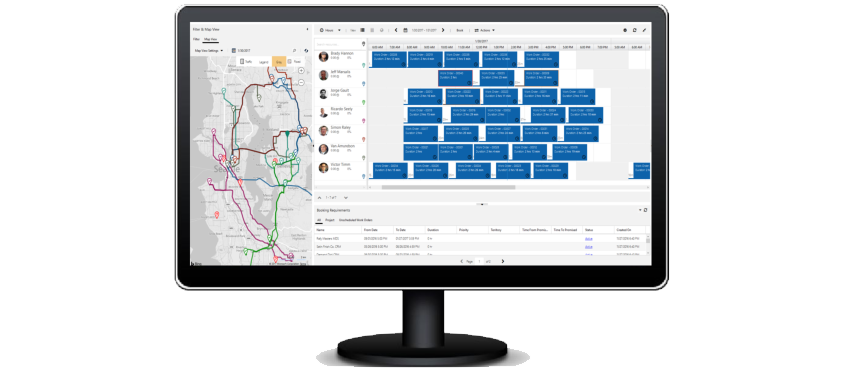
The schedule board shows every technician, every job and every gap. Drag and drop when you want control. Let the resource scheduling optimisation engine do it when you want the machine to solve for travel time, skills, territory and priority across a hundred jobs at once. It will find efficiencies a human genuinely cannot, because a human cannot hold a hundred variables at once.
Work orders with everything attached
Site details, asset history, required skills, parts, safety notes, access instructions. The tech opens the job and knows what they are walking into.
A mobile app that works offline
Regional Australia has holes in it. The app keeps working in the hole and syncs when it comes back. Photos, signature, time, parts used, notes, all captured on site.
Assets and preventative maintenance
Every serviced asset has a record and a history. Schedule maintenance on a cycle, generate the work orders automatically, and stop losing recurring revenue because nobody remembered the twelve month service.
Inventory across vans and warehouses
Know what is on which vehicle. Consume stock against the job. Trigger replenishment.
Customer visibility
Booking confirmations, technician tracking, arrival windows. The calls asking where someone is largely stop.
Copilot
Summarises long asset histories before a tech attends, drafts the work order write up from field notes.
The part most people underestimate
Field Service pays for itself in the boring places.
Job to invoice
When completion data captures on site and flows to Business Central, invoicing goes from weeks to same day. That is not a productivity story, it is a cash flow story, and for a services business it is usually the single largest measurable return.
Capacity
Most field businesses discover they have more capacity than they thought once travel time is optimised. That is an extra job or two a week per tech without hiring anyone.
The data
After six months you know your real average job duration, your first time fix rate, and which jobs you are quoting wrong. Most operators are surprised by at least one of those.
Where it connects
Because Dynamics 365 sits on the same Microsoft cloud as the rest of your stack, the joins are already there. With Power Platform, anything specific to your trade gets built rather than worked around. Oxana AI Studio does that work in house.
Business Central
Work orders become invoices and parts consumption hits inventory automatically.
Dynamics 365 Customer Service
A support case that needs someone onsite converts to a work order in one step.
Dynamics 365 Sales
The quote for a job becomes the job.
Microsoft 365 and Teams
Techs use the logins and tools they already have.
How we deliver
A pilot first, a whiteboard that stays up for a fortnight, and tuning once real data arrives.
Discovery
We spend time with your schedulers and go out with a tech. You cannot design a field system from a boardroom. The van tells you more than the org chart.
Design
Work order types, skills matrix, territories, booking rules, mobile forms. We start with the ninety percent case and handle the exceptions after go live, not before.
Build
Sandbox configuration, mobile forms built to match the checklists your techs already use, integrations connected.
Pilot
We go live with a small crew first. Always. Field rollouts fail when they land on everyone at once and the whiteboard gets thrown out on day one.
Adoption
Training for schedulers and techs separately because they need different things. The whiteboard stays up for a fortnight. It comes down when the team stops looking at it.
Ongoing
Oxana stays for the tuning. Scheduling rules need adjusting once real data arrives. That is expected.
Who this suits
Australian field businesses with roughly five to a hundred technicians.
It suits you if you already run Microsoft 365. It suits you especially if you have internal IT, because Oxana works alongside your team rather than replacing them. They keep ownership and context. We bring the Field Service depth that does not justify a full time hire. That is the co managed model we built the business on.
Common questions
About field service management software, service scheduling software and job management for Australian businesses.
How long does a Field Service implementation take?
A crew under twenty five techs typically runs eight to twelve weeks including the pilot. Adding Business Central integration or heavy mobile customisation extends it. Fixed price after discovery.
What does Dynamics 365 Field Service cost in Australia?
Only your dispatchers and techs need licensing, not your whole company, which keeps the cost contained. We will model the right licence mix for you and quote implementation separately, fixed price after discovery.
Does the mobile app work without signal?
Yes. Full offline capture, syncs when reconnected.
Can we migrate from simPRO, ServiceM8 or Aroflo?
Yes. All three are common. We are honest about the trade offs. Those tools are strong at what they do, and if you are happy and integrated, we will say so. The case for Dynamics is usually that you want field, finance, sales and support on one platform rather than four.
Do we need Business Central too?
No. Field Service runs standalone. The invoicing integration is where a lot of the value sits, but it is not a prerequisite.
Talk to us
If your schedule lives on a whiteboard and your invoicing lives three weeks behind, book a call. We will look at how your jobs actually run and tell you what is worth changing.
Oxana is a Microsoft Cloud Solutions Partner serving Sydney, Melbourne and Brisbane. The IT team behind your IT team.